


Most email campaigns do not fail because email has stopped working. They fail for fixable reasons: a list without proper consent, one message sent to everyone, a domain Gmail and Outlook do not trust, or a report that celebrates opens while enquiries stay flat. This guide covers the email marketing mistakes that most often hold Australian businesses back, the signs that show you are making each one, and exactly how to fix them.
Start with the symptom finder below. It points you straight to the mistakes most likely behind the problem you are seeing, so you can fix what matters first.
What Are the Most Common Email Marketing Mistakes?
The most common email marketing mistakes fall into four groups. Poor targeting means bought lists, missing consent and no segmentation. Weak messaging covers vague subject lines, generic content and too many calls to action. Technical issues include missing email authentication, untested emails and layouts that break on phones. Poor measurement means judging campaigns by open rates instead of leads and sales.
These problems feed into each other. Poor targeting leads to spam complaints. Complaints damage your sender reputation, which pushes more emails into spam and lowers results again. That is why one fix often lifts several numbers at once.
Find your symptom
| What you are seeing | Most likely cause | Quick check | Read |
|---|---|---|---|
| Emails land in spam or junk | Missing authentication or a damaged sender reputation | In Gmail, open the email, choose More, then Show original. Look for PASS next to SPF, DKIM and DMARC. | Mistake 9, Mistake 2 |
| Open rate jumped, but enquiries did not | Automatic opens from privacy features, not real readers | Compare clicks and form submissions with the same send last month | Mistake 12 |
| People click, but nobody enquires | The landing page or offer does not match the email | Check conversions for that landing page in Google Analytics | Mistake 6, Mistake 12 |
| Unsubscribes spike after a send | Content was not relevant, or you sent more often than expected | Compare the unsubscribe rate of that send with your last five | Mistake 5, Mistake 7 |
| Hard bounces are high | An old, imported or bought list | Review the bounce report by list source | Mistake 2 |
| Replies point out broken names or links | No testing before sending | Send a test to three inboxes, including one on a phone | Mistake 10 |
12 Email Marketing Mistakes to Avoid
Each mistake below follows the same pattern: why it hurts, the signs you are making it, and how to fix it.
1. Sending Emails Without a Clear Marketing Strategy
A campaign without one objective cannot choose its audience, offer or success measure. So even when it goes out on time, nobody can say whether it worked.
Signs you are making this mistake
- You describe the campaign as “the monthly newsletter” rather than by its goal.
- Reports show opens and clicks, but nobody knows how many enquiries it produced.
- One email tries to share news, push an offer, promote a blog and run a survey.
How to fix it: Write a one-line brief before every send: who it is for, the one action you want, and how you will measure it. For example: “Past clients in Victoria, book an EOFY review, measured by bookings within 14 days.” Then map your email marketing strategy across the Australian year, around EOFY in June, the Christmas shutdown and your own busy seasons.
2. Buying Email Lists or Sending Emails Without Consent
Under the Spam Act 2003, you need consent before you send a commercial email, and ACMA says it is up to you to prove it. That applies to every address on a bought list too, and lists made with address-harvesting software are banned outright. Unwilling recipients also bounce and complain, which damages delivery for your whole list.
Signs you are making this mistake
- You cannot say where, when or how a contact agreed to hear from you.
- Your list includes addresses copied from directories, LinkedIn or trade show badge scans.
- Past customers stay on your marketing list years after their last purchase.
How to fix it: Grow your list through opt-in website forms, checkout tick boxes and useful downloads such as a price guide. Tag every contact with their consent source and date. Do not email people to ask for permission, because ACMA treats that request as a marketing message itself. ACMA actively enforces these rules, and recent penalties are listed in the FAQs below.
3. Ignoring Email List Segmentation
Sending one message to your whole list is quick, but it guarantees that most readers get something only partly relevant. Relevance drives clicks, and clicks drive enquiries.
Signs you are making this mistake
- Every campaign goes to “All subscribers”.
- Regional customers receive offers that only apply in the metro area.
- New enquiries and ten-year customers receive exactly the same email.
How to fix it: Start with two or three segments you can maintain, based on customer stage, service interest and state. A Melbourne heating and cooling company, for example, could send past ducted heating customers a pre-winter service reminder, send split system enquirers a short buying guide, and confirm travel lead times for regional Victorian subscribers. Each email is shorter and easier to act on.
4. Writing Weak or Misleading Subject Lines
Your subject line decides whether an email is opened, ignored or reported as spam. Vague lines get ignored, and misleading ones get reported.
Signs you are making this mistake
- Subject lines read like labels, such as “November newsletter”.
- The preview text shows “View this email in your browser”.
- Complaints rise after sends with urgent or fake “RE:” subject lines.
| Weak subject line | Stronger version | Why it works |
|---|---|---|
| Our November newsletter | 3 jobs to book before the Christmas shutdown | Specific, useful and tied to a real deadline |
| URGENT: Last chance!!! | Winter service slots close Friday | Honest urgency without spam signals |
| RE: your enquiry | Your split system quote options | Clear and relevant, with no fake reply prefix |
How to fix it: Write the preview text at the same time as the subject line. Preview text is the short line most inboxes show beside or under the subject, so use it to add detail rather than repeat the subject. Personalise with something meaningful, such as a suburb or a product the reader owns.
5. Sending Irrelevant or Generic Content
Subscribers join your list for a reason. When your emails stop matching that reason, they stop reading and then unsubscribe.
Signs you are making this mistake
- Most emails are about your company rather than your customer’s problem.
- Unsubscribes jump after promotional sends.
- Nobody ever replies to your emails.
How to fix it: Use your enquiry forms as your content brief. The questions people ask before they buy are exactly what your subscribers want answered. An accounting firm, for example, might send sole traders a BAS deadline reminder, send small business owners an EOFY preparation guide, and send existing clients a list of documents to gather before their annual review.
6. Using Too Many Calls to Action
A call to action (CTA) is the step you want the reader to take, such as “Book a consultation”. When an email offers five or six competing CTAs, readers hesitate and often do nothing at all.
Signs you are making this mistake
- Your email contains more than two buttons.
- Clicks are spread thinly across many links, with few on your main offer.
- On a phone, the main button sits far below the first screen.
How to fix it: Choose one primary action per campaign. Place a clear button near the top and repeat it once further down. Make the button text say what happens next, so “Get my quote” rather than “Click here”. Secondary links, such as your phone number or social profiles, can sit quietly in the footer.
7. Sending Emails Too Frequently or Too Rarely
There is no single right frequency for every business. A retailer sending weekly offers and a law firm sending quarterly updates can both be right. Problems start when frequency or timing does not match what subscribers expect.
Signs you are making this mistake
- Unsubscribes and complaints jump when you increase how often you send.
- After a long gap, people no longer recognise your name and report you as spam.
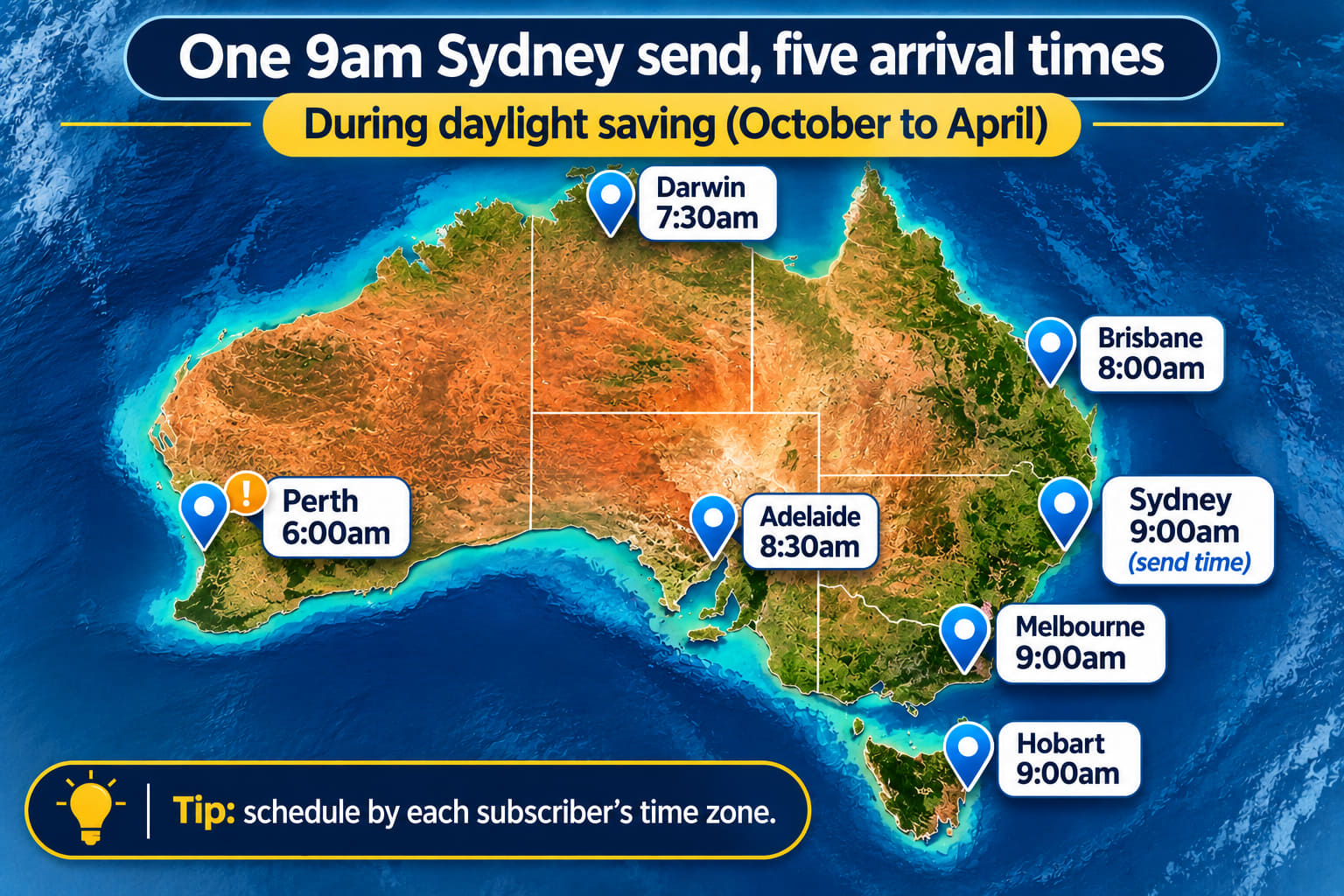
- You send at 9am Sydney time, so Perth subscribers receive it at 6am during daylight saving.
How to fix it: Tell people how often you will email when they sign up, then keep that promise. Check unsubscribe and complaint rates after every send, and ease back if they climb. Schedule by each subscriber’s time zone where your platform allows it. Queensland, Western Australia and the Northern Territory do not use daylight saving, so the gaps between states change between October and April.
8. Ignoring Mobile Email Design
Many subscribers read email on a phone, often between other tasks. If the layout breaks or the button is hard to tap, the enquiry is lost in seconds. Your email platform’s device report shows the exact split for your own list.
Signs you are making this mistake
- Two-column layouts appear squashed on a phone.
- Key offers sit inside images that some inboxes block by default.
- The landing page loads slowly or needs zooming on mobile.
How to fix it: Use a single-column responsive layout, body text large enough to read without zooming, and buttons big enough to tap with a thumb. Write key messages as live text, not images, and check that your logo stays visible in dark mode. Send a test to your own phone before every campaign, and make sure the email leads to a mobile-friendly landing page.
9. Neglecting Email Deliverability
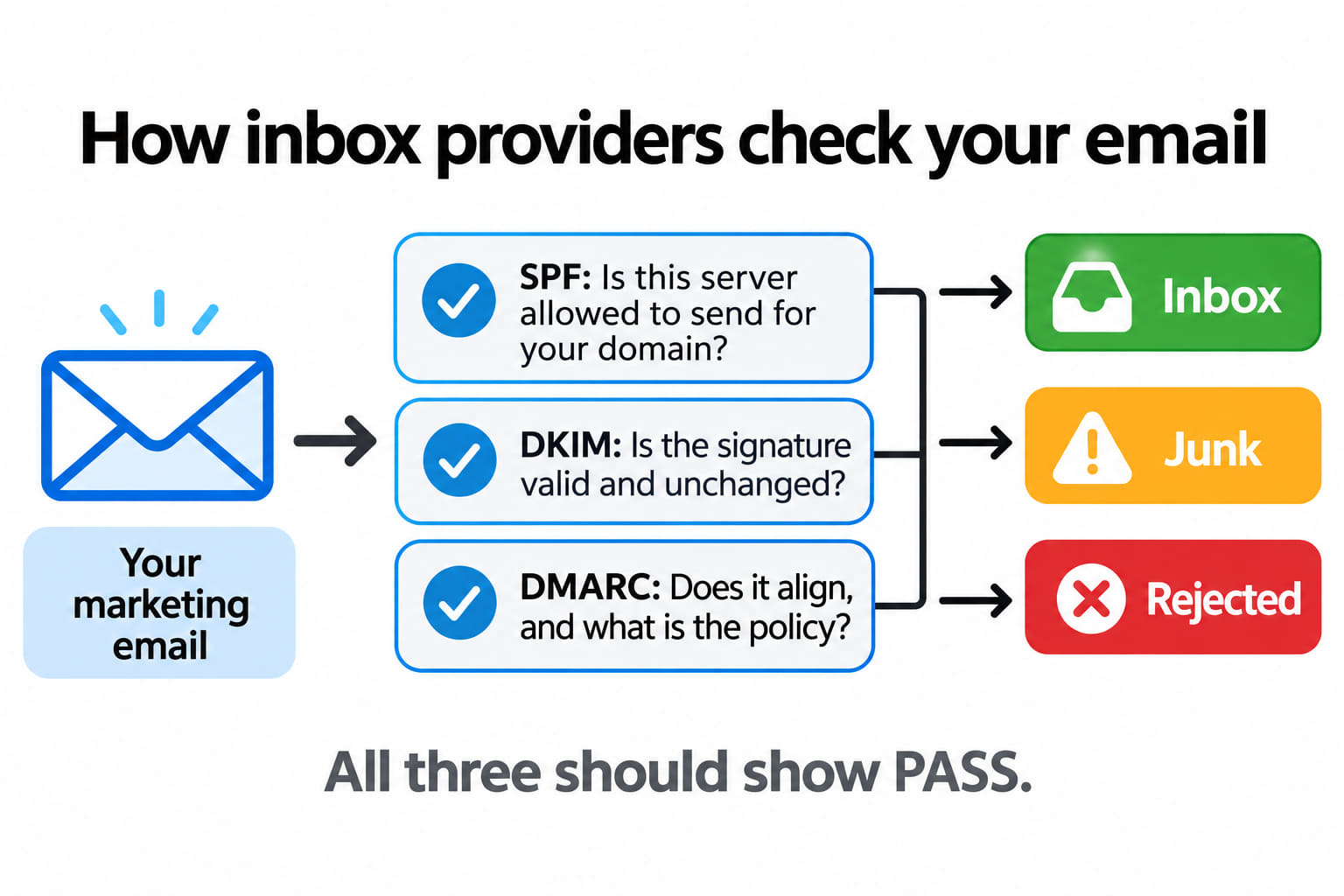
Email marketing deliverability is your ability to reach the inbox instead of the spam folder. Gmail and Outlook decide where your email lands by checking who you are, how you send and how people react to your emails.
Signs you are making this mistake
- Customers say your emails land in junk or spam.
- Show original in Gmail displays FAIL next to SPF, DKIM or DMARC.
- Bounce rates climb whenever you email an older part of your list.
| Factor | What it means in plain language |
|---|---|
| SPF | A DNS record listing which services may send email for your domain |
| DKIM | A digital signature proving the email came from your domain and was not altered |
| DMARC | A policy telling inbox providers what to do with emails that fail SPF or DKIM |
| Sender reputation | The trust inbox providers place in your domain, based on your sending history |
| Bounce rate | The share of emails that could not be delivered, often to addresses that no longer exist |
| Spam complaints | How often recipients click “Report spam” on your emails |
The rules have tightened. Google’s email sender guidelines require every sender to use SPF or DKIM, and bulk senders of around 5,000 or more emails a day to Gmail accounts must use SPF, DKIM and DMARC. Google also recommends keeping the user-reported spam rate below 0.1% and never letting it reach 0.3%. Microsoft now requires SPF, DKIM and DMARC for domains sending over 5,000 emails a day to Outlook.com, Hotmail and Live addresses, and since 5 May 2025 non-compliant mail goes to Junk.
Example SPF record (TXT record on yourdomain.com.au)
v=spf1 include:_spf.google.com include:[include value from your email platform] ~all
Example DMARC record (TXT record on _dmarc.yourdomain.com.au)
v=DMARC1; p=none; rua=mailto:dmarc-reports@yourdomain.com.au
Three details trip up many businesses. A domain can have only one SPF record, so add every sending service to the same record instead of creating a second one. SPF allows a maximum of 10 DNS lookups, so remove services you no longer use. Start DMARC at p=none, read the reports, then move to quarantine and reject once all your legitimate senders pass. DKIM is a key your email platform generates for you to publish in your DNS.
How to fix it: Follow your platform’s authentication steps and add the records to your domain’s DNS settings. Remove hard bounces after every campaign, and send a re-engagement email to long-inactive subscribers before removing them. If you send to many Gmail users, monitor your domain in Google Postmaster Tools.
10. Failing to Test Emails Before Sending
A broken link or a “Hi {FirstName}” greeting can undo hours of work, and once an email is sent you cannot take it back.
Signs you are making this mistake
- Subscribers reply to point out a blank name, a typo or a broken link.
- Images display in Gmail but appear broken in Outlook on desktop.
- A/B test winners are picked on opens rather than clicks or enquiries.
How to fix it: Send tests to at least three inboxes, including one phone. Check the subject line, preview text, every link and its tracking tags, image loading and alt text, personalisation fields with a fallback such as “Hi there”, the mobile layout and every CTA button. For A/B tests, change one element at a time and judge the winner on clicks or enquiries.
11. Ignoring Email Automation
Email automation sends a message when a person takes an action, without anyone pressing send. Businesses that only send one-off campaigns miss the moments when people are most interested.
Signs you are making this mistake
- New subscribers wait weeks for their first email.
- Following up an enquiry depends on someone remembering to do it.
- Inactive subscribers are deleted without a final check-in.
How to fix it: Set up five core sequences: a welcome series, an enquiry follow-up, customer onboarding, a re-engagement campaign and an abandoned enquiry sequence for people who start a quote form but do not finish, where you hold their consent. A Brisbane physiotherapy clinic, for example, could send three welcome emails: what to expect, an answer to the question the front desk hears most, and an invitation to book. Review every automated email each quarter for outdated prices, names and links.
12. Tracking Open Rates Instead of Leads and Sales
Open rates are now a weak signal. Apple Mail Privacy Protection preloads emails, so many are recorded as opened when nobody read them. On business lists, security scanners can also click links automatically and inflate click counts.
Signs you are making this mistake
- Your open rate rose sharply, but enquiries stayed flat.
- Your campaign report has no column for leads or revenue.
- Nobody can say what a subscriber or a campaign is worth to the business.
| Metric | What it tells you |
|---|---|
| Click-through rate | The share of recipients who clicked a link |
| Conversion rate | The share of clickers who completed your goal, such as a form or purchase |
| Leads generated | Enquiries you can trace back to the email |
| Revenue | Sales or contract value linked to the campaign |
| Unsubscribe rate | Whether your content or frequency is putting people off |
| Bounce rate | The overall health of your list |
| Email marketing ROI | Revenue earned compared with what the campaign cost |
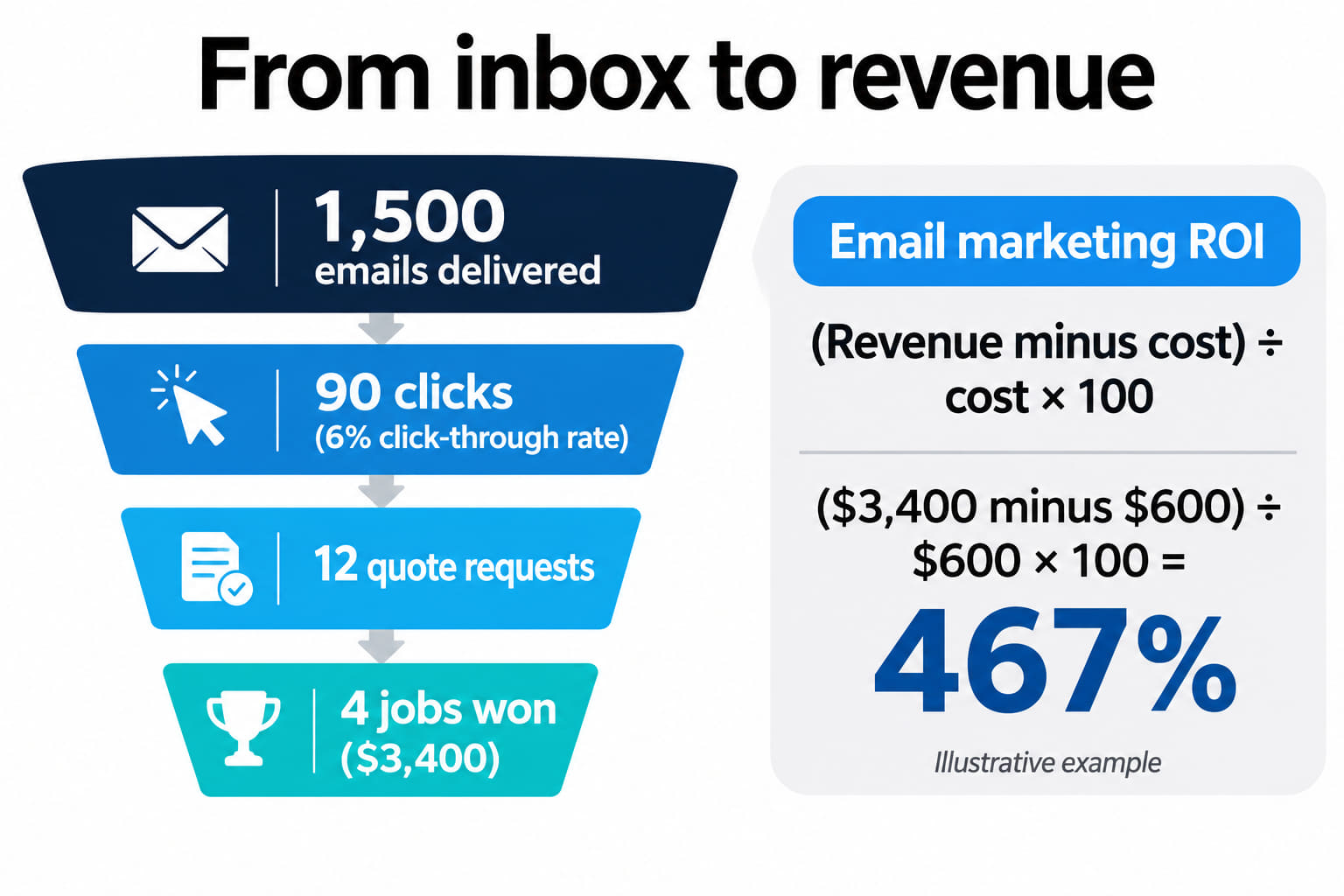
Add UTM tags to every email link. UTM tags are short labels added to the end of a web address, so Google Analytics can show which campaign brought each visitor and enquiry. Then calculate return on investment with one simple formula.
Email marketing ROI = (revenue from the campaign minus campaign cost) divided by campaign cost, multiplied by 100
Worked example (illustrative figures): A Perth commercial cleaning company emails 1,500 past and current clients about a new end-of-lease service. It earns 90 clicks (6% click-through rate), 12 quote requests and 4 jobs worth $850 each, so $3,400 in revenue. If the campaign cost $600 to plan, write and send, the ROI is ($3,400 minus $600) divided by $600, multiplied by 100, or about 467%. The open rate does not appear anywhere in that calculation.
Australian Email Marketing Compliance Checklist
Email marketing compliance in Australia centres on the Spam Act 2003, which ACMA enforces. The points below summarise guidance from business.gov.au and ACMA. They are general information, not legal advice, so speak to a legal adviser about your own situation.
| Requirement | What the guidance says |
|---|---|
| Spam Act 2003 | Sets the rules for commercial electronic messages, including marketing emails and SMS |
| Express consent | The person knows and accepts they will receive your marketing, for example by ticking a box. ACMA calls this best practice. |
| Inferred consent | May apply when someone gave you their address and would reasonably expect your marketing, usually through an existing relationship. It is less reliable than express consent. |
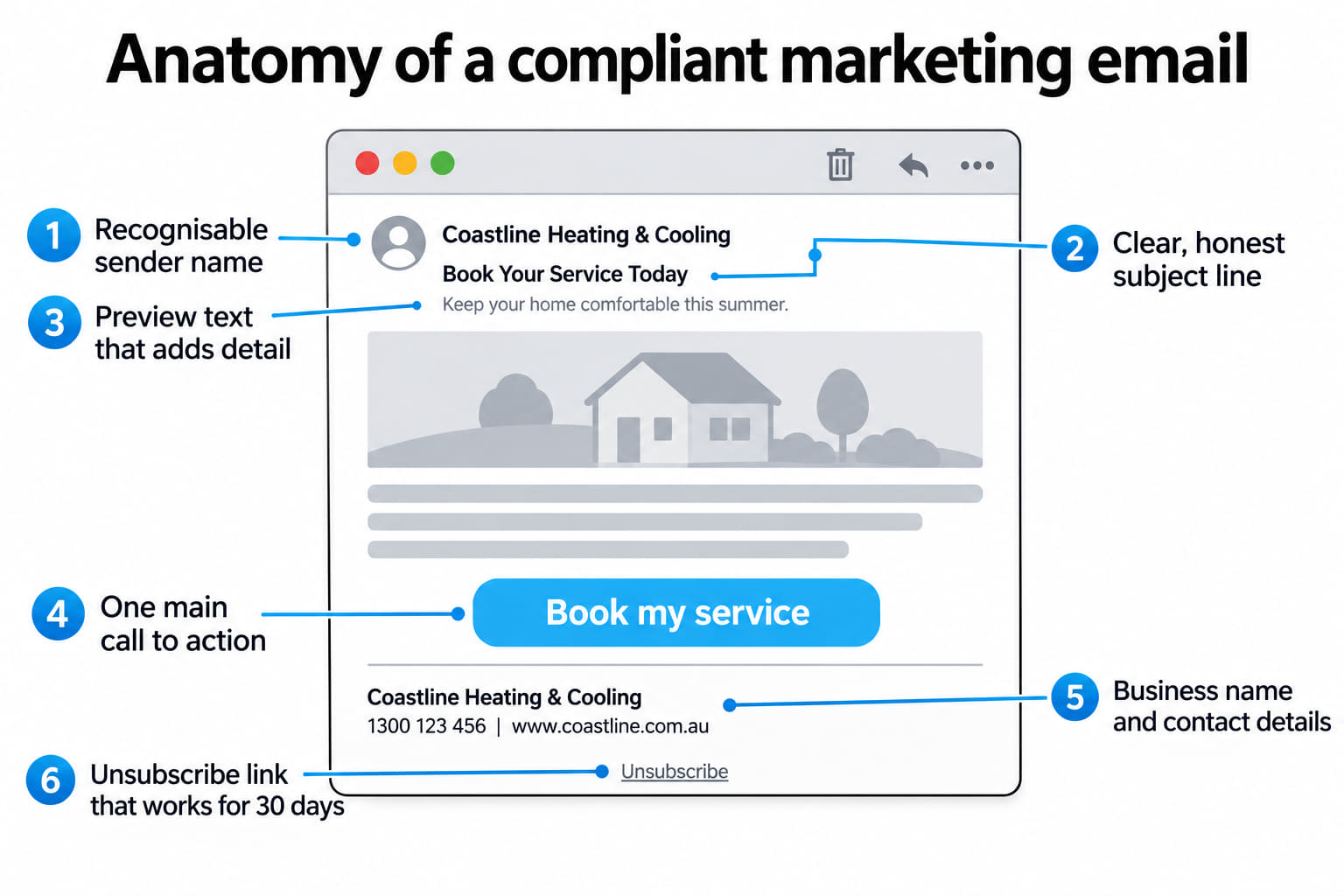
| Sender identification | Each email must accurately identify your business and include correct contact details. If an agency sends on your behalf, the email must still identify your business. |
| Functional unsubscribe facility | Clear, free unsubscribe instructions that work for at least 30 days after sending, with no login, account or extra personal details required |
| Unsubscribe requests | Processed no later than five working days after the request |
| Consent records | Record who gave express consent, when and how. The responsibility to prove consent sits with you. |
Using a US template or platform? Check these differences
Many email platforms and templates are built for the US market, where the rules are looser. Following US defaults in Australia can leave you exposed.
| Rule | Australia (Spam Act 2003) | United States (CAN-SPAM) |
|---|---|---|
| Permission model | Opt-in: you need consent before sending | Opt-out: you can email until someone asks you to stop |
| Unsubscribe deadline | Five working days | 10 business days |
| Proof of consent | The sender must be able to prove it | No general consent requirement |
A simple habit keeps you organised: store the consent source and date against every contact, such as “website quote form, March 2026”. If you ever need to show consent, the record is already there.
How to Fix an Underperforming Email Marketing Campaign
Work through these steps in order. Each one rules out a cause before you spend time on the next.
Step 1
Review campaign objectives
Confirm what the campaign was meant to achieve and how you planned to measure it. If the goal was enquiries, stop judging it by opens.
Step 2
Check subscriber quality
Check where each part of your list came from and whether you hold consent records. Remove hard bounces, duplicates and unknown sources.
Step 3
Review segmentation
Check whether each email reached the people most likely to care. Split broad sends into two or three focused groups for the next campaign.
Step 4
Analyse subject lines and content
Compare your best and worst recent campaigns by clicks, not opens. Look for patterns in topic, length, offer and tone.
Step 5
Test email deliverability
Confirm SPF, DKIM and DMARC show PASS. Check bounce and complaint rates, then send tests to Gmail and Outlook inboxes.
Step 6
Improve the CTA and landing page
Make sure the button asks for one clear action and the landing page continues the same message. Cut extra form fields.
Step 7
Track conversions and enquiries
Add UTM tags and form tracking in Google Analytics. Report leads, revenue and cost per lead after every campaign.
Email Marketing Checklist Before Sending a Campaign
Run through these ten checks before every send. Copy them into your campaign process so nothing is left to memory.
- Consent: every recipient opted in, and you hold a record of it
- Audience: the email goes to the right segment, not the whole list by default
- Objective: one clear goal and one success measure
- Subject line: clear, honest and paired with useful preview text
- CTA links: one primary action, and every link opens the right page
- Sender details: business name, contact details and a working unsubscribe link
- Mobile design: reads well on a phone and in dark mode
- Authentication: SPF, DKIM and DMARC pass for your sending domain
- Testing: test emails checked, including personalisation fields
- Tracking: UTM tags and form tracking work on the landing page
Need Help Improving Your Email Marketing Campaigns?
Most of the email marketing mistakes in this guide can be fixed. The hard part is working out which ones are holding your campaigns back, then fixing them in the right order.
GoingIT helps Australian businesses plan, build and measure email campaigns from South Melbourne. Our email marketing services cover custom strategy built around your audience, lifecycle marketing from welcome to re-engagement, creative content such as newsletters and offers, and performance tracking focused on enquiries rather than opens. Email also works best alongside your other channels, which is why it often forms part of our wider digital marketing services in Australia.
Frequently Asked Questions About Email Marketing in Australia
What are the penalties for breaching the Spam Act in Australia?
ACMA can issue infringement notices and accept court-enforceable undertakings, and a court can impose higher penalties. In March 2026, Lululemon paid $702,900 for marketing emails without a functional unsubscribe facility. In November 2026, SpinTel paid a $653K penalty for spamming former customers. ACMA reports that businesses paid over $11 million in spam penalties in the 18 months to November 2026. Most cases come from broken consent or unsubscribe processes, not deliberate spamming.
Can I email business addresses I find on a company website?
Only in narrow cases. Under the Spam Act, publishing an address does not by itself give consent. Consent can be inferred only when the address is conspicuously published, it is reasonable to assume the person agreed to that publication, there is no statement saying they do not want unsolicited commercial messages, and your email relates to their work role. Collecting addresses in bulk with address-harvesting software is banned.
Do charities, schools and government bodies need consent to send marketing emails?
Some of their messages are exempt. The Spam Act treats messages from government bodies, registered political parties and registered charities about goods or services they supply as designated commercial electronic messages. The same applies to educational institutions emailing current or former students. These messages do not need consent or an unsubscribe facility, but they must still identify the sender accurately.
Does the Privacy Act apply to email marketing in Australia?
Partly. The OAIC says APP 7, the direct marketing principle, generally does not apply to marketing emails or SMS, because the Spam Act covers them. Other Australian Privacy Principles, such as APP 6 on using personal information, can still apply. Many businesses with an annual turnover under $3 million are currently exempt from the Privacy Act, but the government released draft reforms in August 2026, so check the OAIC direct marketing guidance for updates.
How quickly do I need to process unsubscribe requests for Gmail users?
Faster than Australian law requires. The Spam Act allows up to five working days. Gmail expects bulk senders, those sending around 5,000 or more emails a day to Gmail accounts, to offer one-click unsubscribe and process requests within two days. The simplest approach is to set your email platform to suppress unsubscribes instantly, which meets both standards.
Do Australian businesses need double opt-in for email marketing?
No, the Spam Act does not require double opt-in. It is still worth considering. When a new subscriber clicks a confirmation link, you get a timestamped record of express consent and fewer fake or mistyped addresses. That makes your consent records stronger and your bounce rate lower.
Should we use an Australian email marketing agency or keep campaigns in-house?
In-house works when someone has time to plan, write, test and report every month, and your domain is already authenticated. An agency makes sense when campaigns go out but enquiries do not come in, or when you need automation built. If you use an overseas provider, the Spam Act still applies when a message has an Australian link, such as being sent by an Australian business or opened in Australia. Whoever you choose, ask how they record consent and whether they report on leads rather than opens. GoingIT’s email marketing team works with businesses across Australia.